

Key Takeaways: AI accelerates work, but people determine whether it creates value. Technology often exposes execution, communication, and le...
3 min read

More Time for Relationships. Less Work Between Conversations.
You have a prospect meeting at 10 a.m. tomorrow.
You check your calendar, search email, review the CRM, do background research, send the agenda, and find the presentation template to prepare for the meeting. After the meeting, you organize notes, write the follow-up, update the opportunity, and create the next task.
The conversation with the prospect might last 45 minutes. The work surrounding it can stretch across your day.
Your company may already have AI in CRM, email, and meeting tools. Having access to those capabilities, though, does not mean everyone knows how to use them together. The next opportunity is helping people turn available technology into better daily execution.
What if you could manage that supporting work through a single conversation with AI, simply by asking?
What if You Could Run Your Sales Workflow in a Single AI Conversation?
Consider a sample workflow in ChatGPT with Outlook, HubSpot, Zoom, Butler Street’s Sales Coach AI, and a company branding plugin connected. The salesperson directs the work in natural language, while the connected tools bring together information, coaching, content creation, and actions behind the scenes.
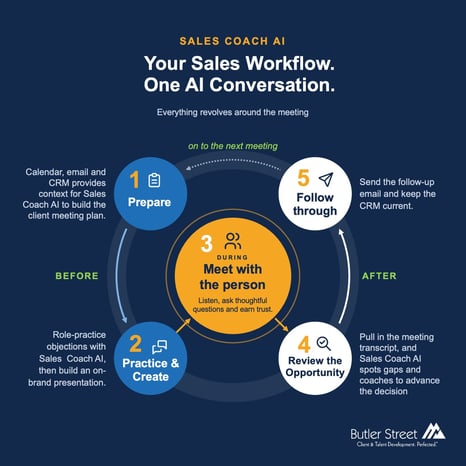
1. Prepare without piecing everything together
The salesperson starts in ChatGPT:
“@Sales Coach AI review my calendar for tomorrow and recent emails with Acme. Use that information and @HubSpot account and opportunity history to help me create a client meeting plan. What do I still need to learn, and what commitment should I seek?”
Perhaps the prospect’s latest email mentions an implementation concern that never reached the CRM. Or an earlier exchange includes a commitment the salesperson needs to address. Outlook provides the meeting details and correspondence. HubSpot adds the account and opportunity information.
Now business context and Butler Street’s sales methodology come together. The salesperson can prepare relevant questions, challenge assumptions, and establish a clear meeting objective.
2. Practice and create what you need
The prospect has raised concerns about managers’ time. The salesperson continues:
“Play the prospect and let me practice responding to that potential objection. Give me feedback afterward.”
Sales Coach AI provides an opportunity to practice before the real conversation.
Next:
“@Sales Coach AI create a short presentation focused on the priorities we identified. Apply our approved template using the @CompanyBranding plugin.”
The salesperson reviews the content and design, making adjustments through the conversation.
There is no need to start over with each request. The relevant account information and preparation already established can inform the next piece of work.
3. Meet with the person
The salesperson conducts the meeting in Zoom.
This is where preparation supports the human work: listening carefully, asking thoughtful questions, understanding business implications, and earning trust.
The client’s answers may change the direction of the conversation. The salesperson uses judgment, follows what matters, and establishes commitments.
Afterward, they return to ChatGPT.
4. Review the opportunity using the conversation
With the Zoom recording available through the connected plugin, the salesperson asks:
“@Zoom pull in the meeting transcript. @Sales Coach AI assess the opportunity, identify gaps, and recommend the next step to advance it.”
For an in-person meeting, the salesperson could provide a verbal recap instead.
The review from Sales Coach AI might reveal that the prospect expressed interest but never clarified who approves the investment. Or that the salesperson promised a proposal before understanding the decision process. It might also surface an important priority that deserves more attention.
The salesperson can question the assessment, add context, and decide how to proceed.
5. Follow through and keep CRM current
The next request builds on that review:
“@Sales Coach AI draft a follow-up email summarizing the prospect’s priorities, confirming our commitments, and proposing the next conversation.”
After reviewing and adjusting the message, the salesperson directs the Outlook connector to send it.
Then:
“@HubSpot log the meeting notes and follow-up email linked to the opportunity. Create the next task for me to confirm decision-maker participation by Thursday.”
With the appropriate permissions and approval, the connector records the activity and creates the task.
The salesperson has completed the supporting work from ChatGPT without opening HubSpot or copying notes between applications.
Keep the relationship at the center
This example brings several capabilities together: business context from connected systems, coaching through Sales Coach AI, content creation, and the ability to take action.
The salesperson remains responsible for accuracy, decisions, and approvals. Available actions depend on the connections and permissions in place.
The vision is a simpler way to work: ask, review, refine, and act, with fewer interruptions between the steps. That creates room to invest more attention in understanding client needs, strengthening relationships, and advancing opportunities.
Which parts of your sales workflow could you bring into one conversation, so you have more time for the conversations that matter? Contact us to explore how Sales Coach AI can support your team’s daily workflow.
FAQs: AI and Sales Workflow
How can AI simplify a salesperson’s daily workflow?
Connected AI can help bring together meeting information, email context, CRM history, coaching, content creation, follow-up, and task management in one conversational workflow.
Can AI replace the salesperson in client meetings?
No. AI can support preparation and follow-through, but the salesperson still needs to listen, ask thoughtful questions, understand business implications, use judgment, and build trust.
What tools can be connected in an AI sales workflow?
The article illustrates a workflow using ChatGPT with Outlook, HubSpot, Zoom, Butler Street’s Sales Coach AI, and a company branding plugin, depending on available connections and permissions.